

Get Started!

Help and Support

Help & support

Committed to excellence in support

Use DEISO’s support channels to get help, resolve issues and find your way around our services and platforms. Whether you need a quick answer, technical troubleshooting or formal support, our tools and team are built to give clear, dependable and timely guidance.

Ask Mirai AI

DEISO's AI assistant for quick orientation across services, platforms, and resources. Use it when you need a fast answer before opening a ticket.

Open Mirai AI →
Supporter and troubleshooter

A guided assistant that walks you through common issues, identifies the right support path, and points to the next concrete step.

Start troubleshooting →

Live chat

Real-time chat with DEISO for short questions and quick guidance — useful when an answer is faster than a ticket.

Start live chat →

Submit a support ticket

Formal support request for issues that need structured follow-up, internal review, or coordinated resolution from the DEISO team.

Submit a ticket →

Send a voice message

Record and send your question by voice — useful when explanation is faster spoken than typed, or for detailed technical context.

Send voice message →

Report a website issue

Flag bugs, broken links, layout breaks, or unexpected behavior on the DEISO website. Every report is reviewed and triaged.

Report an issue →

DEISO platforms

Browse DEISO's platforms, tools, and digital workspace environments built to support sustainability execution and client access.

Explore platforms →

Platform status

Live operational status for DEISO platforms and services — availability, incidents, scheduled maintenance, and performance.

Check status →

Subscribe to status updates

Get email notifications for incidents, scheduled maintenance, and recovery updates so you don't have to check the status page manually.

Subscribe now →
Service status

About the service status page

Check the status

DEISO’s status page shows live data on its website, platforms and services — key performance indicators such as uptime, response times and error rates. It also lists current and recent incidents that could affect DEISO’s services, along with any scheduled maintenance windows: see the Incidents and Maintenances tabs at status.deiso.app.

All times on the status page are in Japan Standard Time (JST).

For more information or to report a technical issue, visit dei.so or deiso.co.jp, or email the support team at .

DEISO Help

Help articles

Step-by-step guides for My DEISO, your certificates and DEISO training.

Help articles

How to get your digital certificate profile

A public, verifiable page for your DEISO certificate — yours to share with employers and clients.

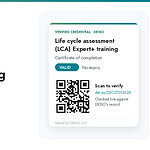
Each certificate DEISO issues has its own page, with your photo, your organisation and a QR code that anyone can scan to check it is valid. Here is how to get yours.

See a live example: dei.so/DSC07012626

Before you start

Please note

Certificates are issued only to trainees who ordered examination and certification with their training program. If you completed a training without ordering them and would like a certificate and a public digital certificate, you will need to pay the examination and certification fees and take the exam. If you pass, DEISO issues your certificate and digital profile once your name has been verified against your passport.

Steps to your digital certificate profile

  1. Sign in to My DEISO Sign in at my.dei.so. If you do not have an account yet, create one there.
  2. Confirm your account Open the confirmation email from DEISO and select the link in it. Then sign in to My DEISO.
  3. Complete your profile In My DEISO, open Profile and fill in your details. Completing every field is strongly recommended, including a headshot as your profile photo — your public certificate page shows what you add here.
    Check your name

    Double-check your first and last name before you save. They must match the names in your passport exactly. Once DEISO issues a certificate, the name on it can only be changed through a name change request with your passport.

  4. Add your company Optional Open the Company tab and fill in your company profile. Uploading your company logo is strongly recommended — it appears on your certificate pages beside the Valid card.
  5. Contact DEISO Ask DEISO for your digital certificate through the contact page.
  6. DEISO reviews and publishes DEISO checks your request against its records — your first name, last name and the training programs you took — and then publishes your digital certificate profile, typically within 4–6 business days. You will receive an automatic email from My DEISO once it is published. You can also check at any time: open Profile in My DEISO, and the View your public profile button appears there as soon as your profile is live.

Ready to start?

Sign in to My DEISO to complete your profile, or contact DEISO if you have a question about your certificate.

Contact Info.

English Address:
Level 21 Shiodome Shibarikyu Building
1-2-3 Kaigan, Minato-ku
105-0022 Tokyo, Japan.

Japanese Address:
〒105-0022 東京都港区海岸1-2-3
汐留芝離宮ビルディング21階, 合同会社DEISO.
Phone (JP): /
Phone (EN):
Fax: /
Email:

Latest News

Get Started with DEISO the Easy Way!

Seven ways to start

Choose the entry point that fits where you are

Not every visitor knows what they need on day one. These seven onboarding paths cover the full range — from knowing exactly which service you want to starting from a question and letting AI guide you. Pick whichever fits.

1If you know what you needRecommended Find the right DEISO service Match your requirement to the right DEISO service in a few clicks. Filter by LCA, GHG, PCF, EPD, ESG, critical review, S-LCA, waste, circular economy, EIA, and more. Fastest path if you already know the scope. Good for “We need Scope 3 review and pre-submission checks before verification” or “We need an EPD prepared for EN 15804.” Open service finder → 2If you’re building internal capabilityRecommended Explore capacity building programs Match your team to the right DEISO training program — LCA, GHG accounting, PCF, EPD development, ESG reporting, environmental review, ISO 14001, and sector programs. Filter by role, level and format. Good for Teams building in-house LCA, GHG or EPD capability, and organisations aligned with workforce development priorities such as Saudi Arabia Vision 2030. Open training finder → 3If you need technical direction before engagementRecommended Free Technical Evaluation Request an initial technical evaluation for your sustainability requirement before committing to a full engagement. DEISO reviews your project need, technical context, enterprise requirement, reporting objective, and service direction to help identify the right path. Good for Enterprises, suppliers, and public sustainability teams that need technical direction before starting LCA, GHG, PCF, EPD, ESG, or sustainability operating system work. Start free evaluation → 4If you want an answer fast Use quick search Click the search icon in the page sidebar, or press Ctrl Shift Del to open the finder from anywhere on the site. Built for quick keyword lookups when you want results in seconds. Good for Anyone who already knows the term they are looking for — a standard, a service name, a training program — and wants to land on it without navigating. Open quick search → 5If you want to explore in depth Use advanced search Search across the full DEISO knowledge base — services, solutions, methodology, case studies, articles and technical resources. Best for when you want to research first, decide later. Good for Researchers, procurement teams and technical leads comparing methodology depth before opening a conversation. Open advanced search → 6If you’d rather see everything at once Browse the full site map A single index of every page and every article on the site — services, training programs, solutions, methodology, case studies and news. Filter it as you type, or read the structure top to bottom. Good for Returning visitors looking for a page they have seen before, and anyone who would rather scan the whole structure than answer filter questions. Open the site map → 7If you’d rather ask a questionAdvanced Ask Mirai AI DEISO Mirai™ AI Pro is DEISO’s AI guidance assistant. Ask a question about your sustainability need — it maps you to the right service, explains the approach, and hands off to the DEISO team when you’re ready. Try asking “What do we need to prepare for CSRD Scope 3 disclosure?” · “How do we start a product carbon footprint?” · “Which DEISO service fits an EPD project?” Ask Mirai →