

Login


More details

Normalization

How to Use Normalization and Weighting in LCA: A Complete Guide from Basics to Advanced
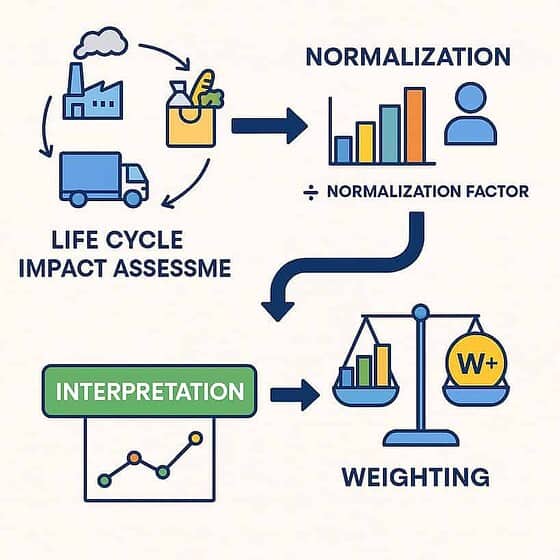
Life cycle impact assessment process illustration.
How to Use Normalization and Weighting in LCA: A Complete Guide from Basics to Advanced

GHG emissions = 1.1 Gt CO₂ eqPopulation = 125MNF = 1,100,000,000 / 125,000,000 = 8.8 t CO₂ eq/person/year🔹 Section 7: How to Calculate Normalized ResultsFormula:Normalized Result = LCIA Result / Normalization FactorExample:LCIA = 1200 kg CO₂ eqNF = 8800 kg CO₂ eq/person/year→ Normalized result = 0.136🔹 Section 8: Raw vs. Normalized Comparison 🔹 Impact Category – Raw vs. Normalized Results Impact Category Raw Result Normalized Result Climate Change 1200 kg CO₂ eq 0.136 Acidification 98 mol H⁺ eq 0.217 Human…

Read more
819 819 DEISO
Normalization and Weighting in Life Cycle Assessment (LCA)
Environmental Impact Assessment sign on grass background
Normalization and Weighting in Life Cycle Assessment (LCA)

Normalization and weighting: Normalisation is commonly used to generate a single numerical score by weighting each impact category and totaling them. Environmental impact scores in LCA are displayed in physical units representing the potential for environmental impact. The results of different impact categories cannot be compared or combined. One method of Normalization is dividing your scores by the scores of a reference situation (e.g., total CO2 emissions from transportation in a particular country or industry). Normalization means relating the data…

Read more
1448 1024 DEISO
Subscribe

You can refer to the Newsletter Subscription Policy.


Start Typing

Contact Info.

English Address:
Level 21 Shiodome Shibarikyu Building
1-2-3 Kaigan, Minato-ku
105-0022 Tokyo, Japan.

Japanese Address:
〒105-0022 東京都港区海岸1-2-3
汐留芝離宮ビルディング21階, 合同会社DEISO.

Phone (JP): 03-5403-6479 / 0488-72-6373
Phone (EN): 070-6969-7700
Fax: 03-5403-6475 / 0488-72-6373
Email: info@dei.so

Latest News

🆘 DEISO Quick Help & Support Center

🛠️ How to Seek Help from the DEISO Website

🔍 Search Assistance
  • Use Ctrl+Shift+D on any Windows or Mac device to launch our global site search with autocomplete.
  • On both desktop and mobile, click the search icon at the left center edge of the screen to open the same powerful search tool.
  • For detailed exploration, visit our Advanced Search page:
    👉 https://dei.so/advanced-search

🤖 Ask AI for Instant Support

💬 Connect with the DEISO Team

📧 Email Us

🧾 Submit a Support Ticket

📶 Check Platform & Website Status

📚 Need More Help?
  • Visit our Frequently Asked Questions (FAQ):
    👉 https://dei.so/faq
  • Explore our full Help Center:
Toggle Dark Mode